
01 · EDIT IN SECONDS
Click to edit in any browser
Open any template locally, click Edit Text in the non-printing top bar, change dish names or prices directly on the sheet, and click Download HTML to keep your updated master file.
Edition 01 · For Restaurants, Cafés & Food Trucks
Three distinct, print-editorial menu templates built as standalone offline HTML files—one for a classic bistro, one for an all-day café, and one for a food truck counter. Edit prices right in your browser, save your copy, and print or export PDF with zero design software.
Instant download · A$9 AUD once · No subscription
Word docs jump columns the moment you edit a line. Subscription design apps lock your menus behind monthly bills. Standalone print-calibrated HTML keeps typography locked while text stays effortless to edit.
Open any template locally, click Edit Text in the non-printing top bar, change dish names or prices directly on the sheet, and click Download HTML to keep your updated master file.
Each menu includes an explicit paper toggle that adjusts the print page rule and layout margins so your menu prints cleanly onto a single sheet in Europe, Australia, the UK, or North America.
No logins, no cloud fonts that disappear, no recurring subscription. Keep the files on your office laptop, print fresh copies before service, or export crisp PDFs for a local print shop.
Every menu comes pre-populated with realistic sample courses so you can see the rhythm immediately—then replace each block with your own dishes.
01-bistro-dinner-menu.html
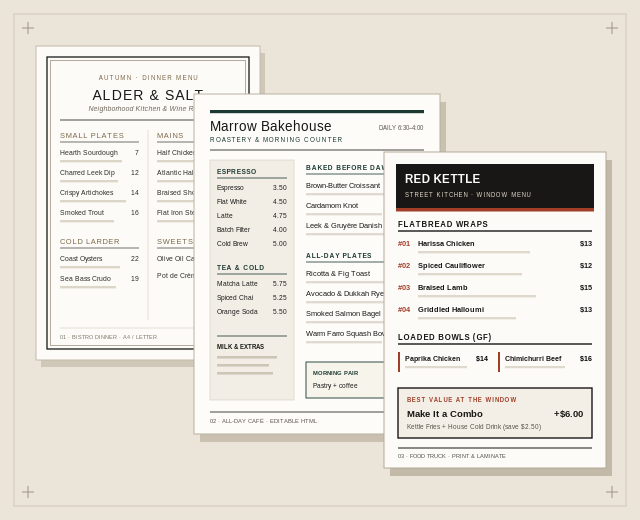
Double-framed editorial broadsheet with balanced two-column courses (Small Plates, Cold Larder, Mains, Sides, Sweets), dietary tags, and serif hierarchy.
02-cafe-bakery-menu.html
Asymmetric two-column counter layout with an oat-tinted espresso/tea rail (Reg / Lge pricing + milk add-ons), baked goods, all-day plates, and a morning-pair special box.
03-food-truck-menu.html
High-contrast window poster built for fast queue reading: solid ink masthead, numbered wrap items (#01–#05), bowl grid, sides, drinks, sauces, and combo deal callout.
EDIT-AND-PRINT-GUIDE.txt
Step-by-step instructions for browser editing, plain-text row duplication, exact A4 / US Letter print-to-PDF settings, paper stock weights, and lamination tips.
Each template has its own grid, type hierarchy, and service cadence. All sample dishes shown below are fictional placeholders included inside the editable files.
Sample: Alder & Salt · Double hairline border, centered serif masthead, 2-column course balance.
Sample: Marrow Bakehouse & Coffee · Archival green accent, left coffee rail, right bakery & kitchen grid.
Sample: Red Kettle Street Kitchen · Heavy ink banner, terracotta strip, numbered wraps, bold combo box.
If you want sharp print menus you can edit yourself before dinner service, this bundle fits. If you need automated POS price sync across twenty branches, skip it.
Delivered as a single compact ZIP archive containing all three editable standalone HTML menus and the A4 / US Letter print guide.
Taskverin · Edition 01
Payment by card, Apple Pay or Google Pay. Prices in AUD, converted by your bank.
Yes. Double-click any menu file to open it in Chrome, Edge, Safari, or Firefox, click Edit Text in the top bar, type over any dish or price, and click Download HTML to save your permanent edited copy. If you want to add or remove rows, the guide shows the exact labeled block to copy or delete in Notepad or TextEdit.
Yes. Every template has a built-in A4 / US Letter selector that updates the @page rule and preview dimensions, and the vertical spacing is calibrated so all three menus fit onto a single page on both paper standards.
Both. Click Print / Save PDF to send directly to an office printer, or choose Save as PDF at 100% scale with headers and footers turned off to generate a crisp print-shop PDF. Template 01 prints cleanly even in pure black and white.
You may edit, print, laminate, or share PDFs of these templates indefinitely for one restaurant, café, bakery, or food truck brand. Please do not resell or redistribute the template files themselves.